2005 · Capabilities and source evidence
Read a component as an evidenced record, not a product card
Use the P2 component library to connect a selected source occurrence, candidate identity and exact graph record.
Open a workspace beside this lesson. Protected links keep their existing access gates; no new permission is granted by this course.
Why this matters
A component label alone cannot identify a physical unit.
Every proposed capability must remain connected to its evidence and assessment.
Read the screen with the explanation
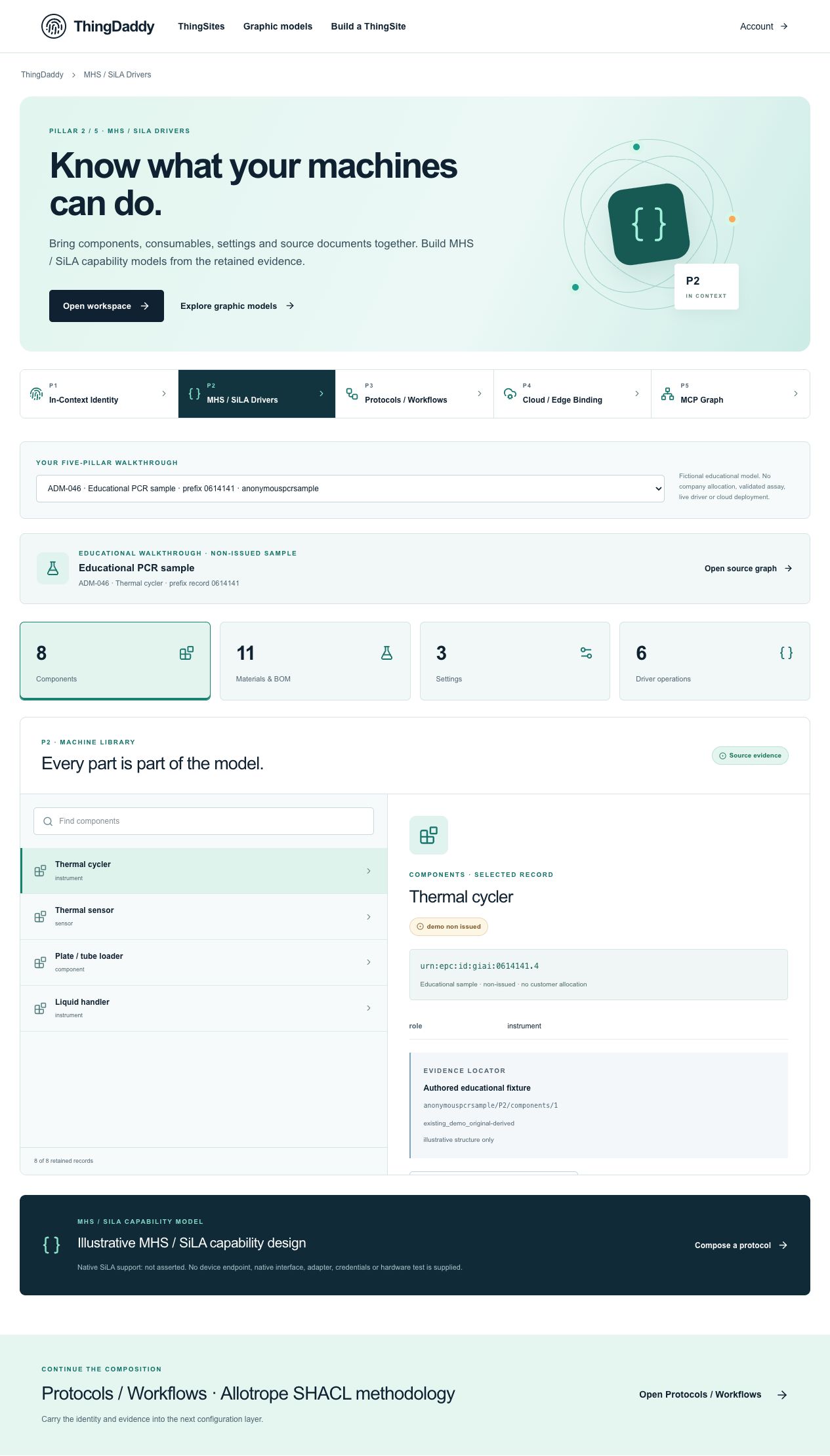
Earlier anonymous demonstration capture · Earlier local anonymous educational preview; not current physical execution or hosted acceptance · not evidence that this exercise has been performed. Open the image for full resolution.
Screenshot provenance
SHA-256 9cdd457bf8fe6607c585061504f84f0e9b5b13ae8311eb97aeade7a8bdf71da9Captured 2026-10-13T06:02:11.409Z. Source-package pin: 2f78a982141bda51ba64ea8ccb3a07f527eec3f77cf89baaa1f05c102197f6fd. Original screenshot bytes preserved.
Step by step
01 Open the full component list
Screen or control: Components
Why: The category count describes retained records, not commissioning.
How: Open P2 and select Components. Read the count, then inspect Thermal cycler.
What you should see: Eight component records are listed; the detail contains the exact candidate GIAI and educational state.
Verify: Record #/P2/modules/0 as the source occurrence and do not replace it with a model name.
02 Search without changing identity
Screen or control: Search Components
Why: Search is presentation filtering, not a new source mapping.
How: Search for sensor and select Thermal sensor. Compare its CPI context with the cycler GIAI, then clear the search.
What you should see: The filtered list changes while original component records and identifiers remain unchanged.
Verify: The sensor occurrence is #/P2/modules/1 even though it is the first visible filtered result; do not record filtered index 0 as its source index.
03 Read source-to-candidate context
Screen or control: Evidence locator · What / How / Why
Why: The evidence and derived representation must stay visibly distinguishable.
How: Read the authored evidence locator, selected identity and compact explanation. Note which fields establish context and which are unknown.
What you should see: The UI keeps source occurrence, identity and authored evidence separately readable.
Verify: Verify allocation authority is absent and no native device support or observed installation was added by the explanation.
04 Inspect and export the same exact record
Screen or control: Open this exact record in P5 · Download this source record
Why: A reviewer should be able to reproduce the selected occurrence.
How: Open the selected record in P5; return to P2 and download its source record. Read the JSON wrapper and record fields.
What you should see: The graph selects the original exact node. The P2 export carries sourcePackage, sourcePrefix, submissionSha256 and the original record.
Verify: Compare the export record.candidateIdentifier.urn with the P5 exact ID and record.evidence.sourceLocator with the visible locator.
What is happening under the surface
The eight component records include instruments, component contexts and an edge host. They are not eight verified installed units.
candidateIdentifier describes the proposed typed address; physicalUnitVerification remains not-performed and hardwareCompatibility unknown.
The evidence object supplies an authored source locator and scope, not an external installation certificate.
Common mistakes
- A filtered row number is not a source occurrence pointer.
- Eight records is not eight independently verified physical devices.
- The word candidate must not disappear when a source record is copied into another view.
The records an agent needs
Library search preserves the original index used by the exact-occurrence link. The export wrapper is a teaching download around the original record, not an installation or driver-test receipt.
Exact retained identities
urn:epc:id:giai:0614141.4urn:epc:id:cpi:0614141.414141.41Anonymous package occurrence pointers
#/P2/modules/0#/P2/modules/1#/P2/modules/1/candidateIdentifier#/P2/modules/1/evidence#/P5/nodes/3Fields or record paths to inspect
namerolecandidateIdentifierphysicalUnitVerificationhardwareCompatibilityevidence.sourceLocatorevidence.assertionScopePointers locate records; hashes pin bytes; lesson numbers locate teaching material. None substitutes for an applicable assigned GS1 identity.
Apply what you learned
Create one component review receipt using the thermal sensor record.
Prepare these outputs
- The exact CPI, original #/P2/modules/1 pointer and evidence locator.
- A saved source-record JSON with the package SHA.
- A list of unresolved physical-unit and compatibility assessments.
Review your work against these checks
- The export and P5 selection resolve to the same exact candidate address.
- The original source occurrence is retained through filtering.
- No transport, physical inspection or approval is claimed.
Check your reasoning
A search makes Thermal sensor the first visible item. Which pointer identifies its original record?
This answer stays in page memory, is cleared when you leave, and is not sent or recorded as certification, validation or authority.Source and current boundaries
Screen basis: the anonymous public educational fixture at /api/demo/pillars, namespace 0614141. No private company record is read by this course.
Pinned assessed package SHA-256: b06ee255d0943a048511092595db4b98281b9b761d1910d19e6c3dba82591d94. Its complete graph contains 329 nodes and 231 directed relationships; original excluded assertions remain separately retained provenance. Lesson locators are educational numbers, not issued GS1 keys.
Scope: fictional authored records, non-issued identity proposals, unknown authority, no physical command, assay validation, cloud deployment or execution authorization.
fictional authored, non-issued, read-only
b06ee255d0943a048511092595db4b98281b9b761d1910d19e6c3dba82591d94Open primary referenceReading, answering a question and opening a diagram do not issue identifiers, validate a scientific method, establish company authority, commission an environment or authorize physical action.