2007 · Capabilities and source evidence
Separate illustrative setting values from approved parameters
Inspect setting definitions, units and source ranges without treating them as an approved assay procedure or an instrument setting command.
Open a workspace beside this lesson. Protected links keep their existing access gates; no new permission is granted by this course.
Why this matters
A parameter needs its identity, unit, applicability and approval state.
A value can be syntactically numeric while scientifically inapplicable or unapproved.
Read the screen with the explanation
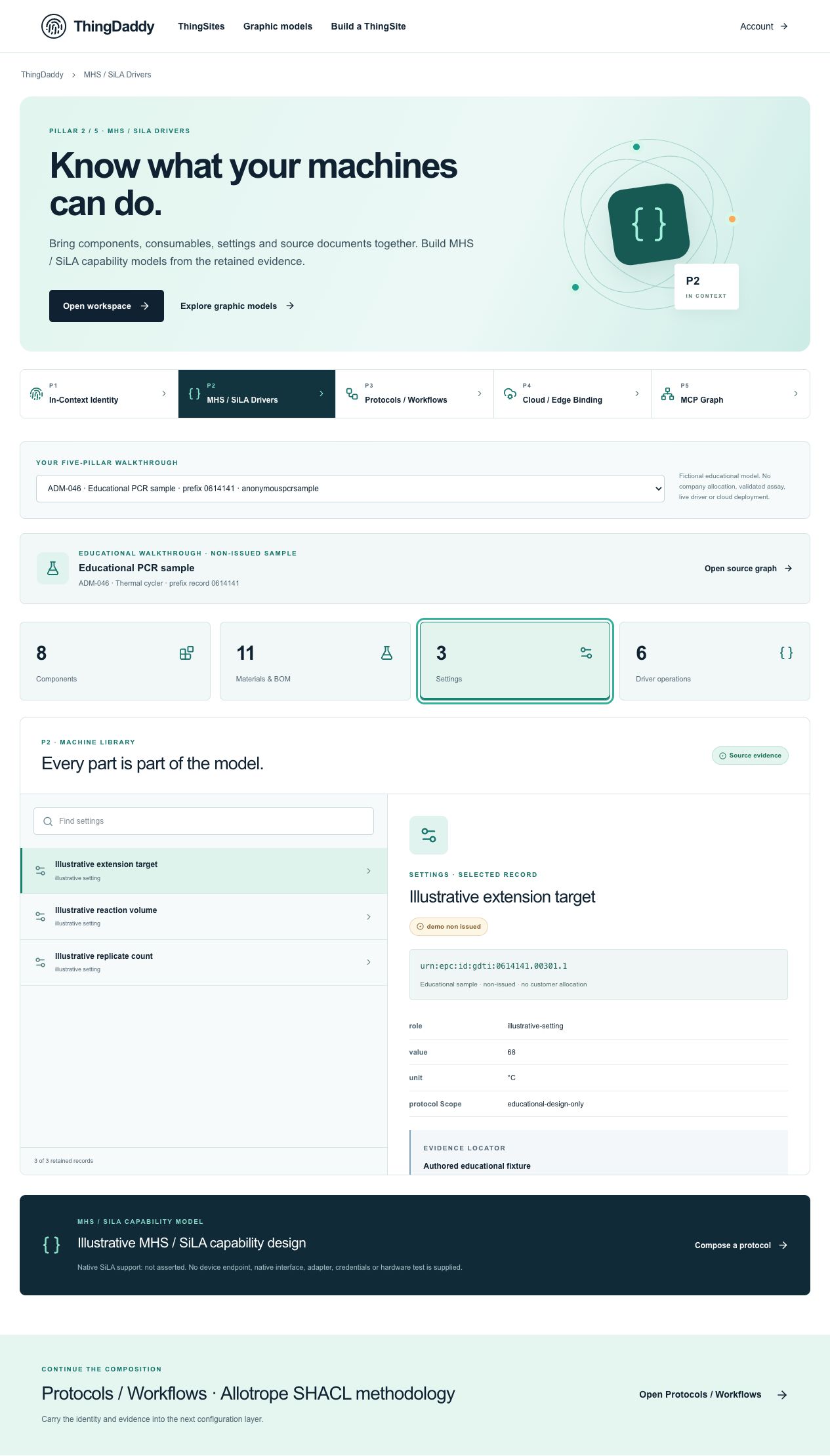
Earlier anonymous demonstration capture · Earlier local anonymous educational preview; not current physical execution or hosted acceptance · not evidence that this exercise has been performed. Open the image for full resolution.
Screenshot provenance
SHA-256 51690e083a27a3abf4b47d0c7b13efdfbf8395ab1c6d97e3cf4af9517c4db8adCaptured 2026-10-13T06:02:47.297Z. Source-package pin: 2f78a982141bda51ba64ea8ccb3a07f527eec3f77cf89baaa1f05c102197f6fd. Original screenshot bytes preserved.
Step by step
01 Read the setting with its unit
Screen or control: Settings · Illustrative extension target
Why: A naked number is not a complete parameter definition.
How: Select Settings, then Illustrative extension target. Read value, unit, protocol scope, identity and source occurrence.
What you should see: The source record is #/P2/configurationSettings/0 with value 68 and unit °C.
Verify: Label the value illustrative and unapproved; do not instruct an instrument or a scientist to use it.
02 Compare a different parameter kind
Screen or control: Illustrative reaction volume · Illustrative replicate count
Why: Physical units and counts must not be confused.
How: Select the other two setting records and note their units and exact GDTIs.
What you should see: The volume uses µL and replicate count uses count; both retain separate definitions.
Verify: Record #/P2/configurationSettings/1 and /2 with their own identities rather than one generic settings row.
03 Read the full constraint fields
Screen or control: Download this source record
Why: The summary shows values but does not establish validation.
How: Download the extension-target record and inspect minimum, maximum, increment, approvedForUse and protocolScope.
What you should see: The retained range is 65–72°C with increment 1, but approvedForUse remains false.
Verify: Explain that an authored range is not an approved biological procedure, a calibrated device range or a SHACL conformance verdict.
04 Trace the definition into graph context
Screen or control: Open this exact record in P5
Why: A setting definition should remain connected to the steps that reference it.
How: Open the exact setting in P5 and inspect uses-setting-definition relationships.
What you should see: The original setting GDTI remains distinct from the protocol step GDTI and cycler GIAI.
Verify: Save one directed edge ID and the unknown-authority provenance. Do not state that the value was applied to hardware.
What is happening under the surface
Three setting records describe illustrative extension target, reaction volume and replicate count.
The displayed values 68°C, 10µL and 3 are fictional teaching values, not laboratory recommendations.
minimum, maximum and increment belong to the authored setting design; approvedForUse is false and protocolScope educational-design-only.
Common mistakes
- Do not turn illustrative values into medical or experimental guidance.
- A displayed setting is not a current measured temperature or volume.
- The read-only library has no parameter-apply control; this lesson does not create one.
The records an agent needs
Setting definition, parameter requirement and measured observation are different record roles. These records have teaching defaults; application-specific protocol requirements and validation remain unresolved.
Exact retained identities
urn:epc:id:gdti:0614141.00301.1urn:epc:id:gdti:0614141.00302.1urn:epc:id:gdti:0614141.00303.1Anonymous package occurrence pointers
#/P2/configurationSettings/0#/P2/configurationSettings/1#/P2/configurationSettings/2#/P3/protocolTemplates/0/ordered_steps/4Fields or record paths to inspect
valueunitminimummaximumincrementprotocolScopeapprovedForUsePointers locate records; hashes pin bytes; lesson numbers locate teaching material. None substitutes for an applicable assigned GS1 identity.
Apply what you learned
Produce a three-row setting definition sheet and a readiness gap list.
Prepare these outputs
- Exact GDTI, value/unit, source pointer and authored range for each.
- Approval and applicability states.
- The evidence needed before a site could approve or apply a parameter.
Review your work against these checks
- All values are identified as illustrative.
- No command or measurement is claimed.
- Definitions, application requirements and observations remain separate.
Check your reasoning
Does a setting falling inside its displayed range prove assay validity?
This answer stays in page memory, is cleared when you leave, and is not sent or recorded as certification, validation or authority.Source and current boundaries
Screen basis: the anonymous public educational fixture at /api/demo/pillars, namespace 0614141. No private company record is read by this course.
Pinned assessed package SHA-256: b06ee255d0943a048511092595db4b98281b9b761d1910d19e6c3dba82591d94. Its complete graph contains 329 nodes and 231 directed relationships; original excluded assertions remain separately retained provenance. Lesson locators are educational numbers, not issued GS1 keys.
Scope: fictional authored records, non-issued identity proposals, unknown authority, no physical command, assay validation, cloud deployment or execution authorization.
fictional authored, non-issued, read-only
b06ee255d0943a048511092595db4b98281b9b761d1910d19e6c3dba82591d94Open primary referenceReading, answering a question and opening a diagram do not issue identifiers, validate a scientific method, establish company authority, commission an environment or authorize physical action.