2013 · Environment and bindings
Compare environment patterns without deploying anything
Compare the two retained cloud patterns as local design options with separate proposed services and missing site bindings.
Open a workspace beside this lesson. Protected links keep their existing access gates; no new permission is granted by this course.
Why this matters
A composition needs an operating environment in addition to hardware and method context.
Selecting a cloud label must not create resources or imply tenant authority.
Read the screen with the explanation
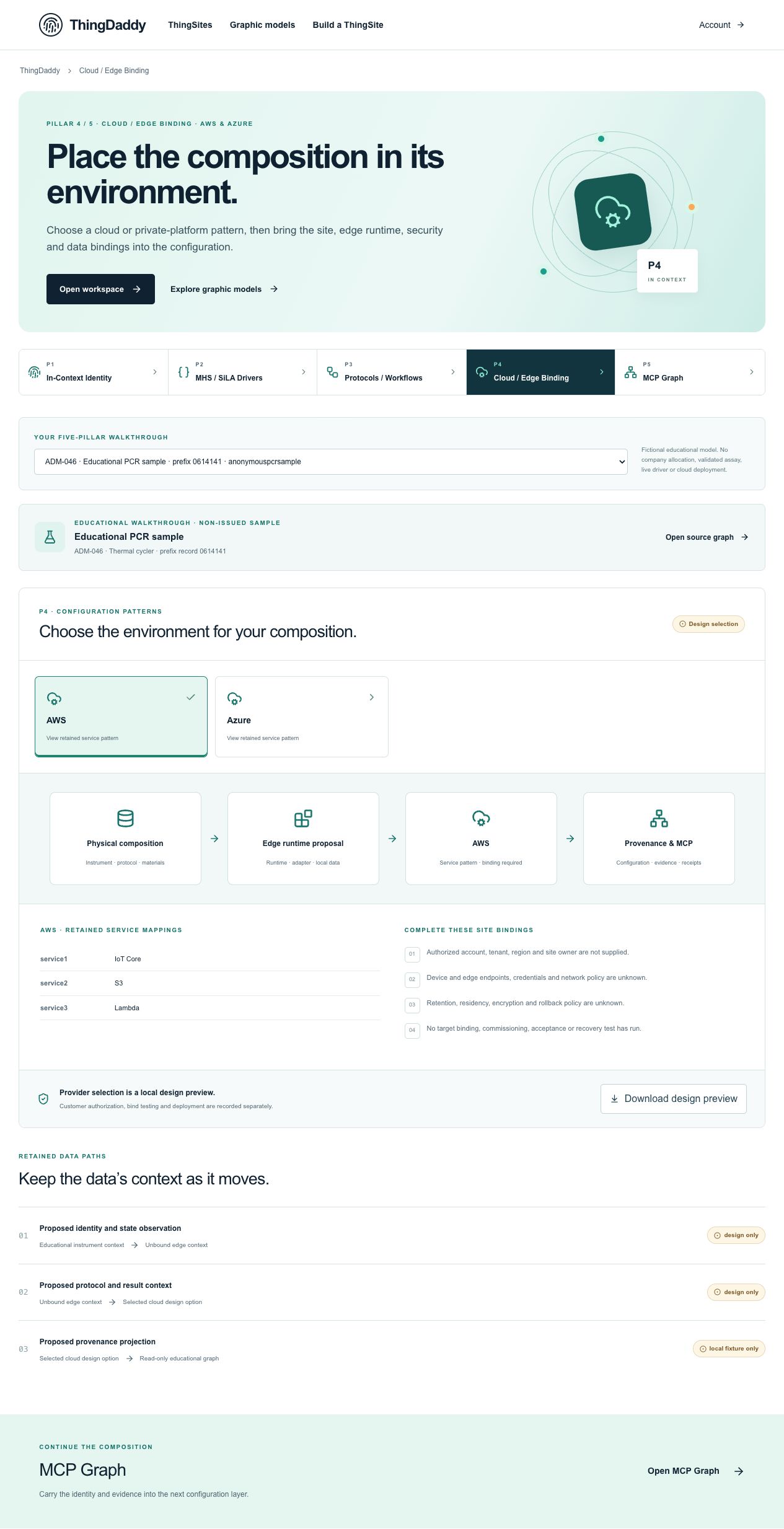
Earlier anonymous demonstration capture · Earlier local anonymous educational preview; not current physical execution or hosted acceptance · not evidence that this exercise has been performed. Open the image for full resolution.
Screenshot provenance
SHA-256 81e0cfc6a87aaa54d18478c25fd3fee99c83111f4b63fd3dbecb0bec5d2023eeCaptured 2026-10-13T05:13:48.156Z. Source-package pin: 2f78a982141bda51ba64ea8ccb3a07f527eec3f77cf89baaa1f05c102197f6fd. Original screenshot bytes preserved.
Step by step
01 Read the default pattern
Screen or control: AWS provider card
Why: The source mapping must be read before making a comparison.
How: Open P4, select AWS and inspect the service mappings and environment diagram.
What you should see: The AWS pattern lists IoT Core, S3 and Lambda as retained design services.
Verify: Record #/P4/cloud/candidatePatterns/0 and its GDTI 00401.1; do not record a created resource ARN.
02 Compare the alternative
Screen or control: Azure provider card
Why: An alternative is a separate design option rather than the same identity renamed.
How: Select Azure and compare the displayed mappings and diagram label.
What you should see: Azure lists IoT Hub, Blob Storage and Functions, using separate design GDTI 00402.1.
Verify: Keep both source patterns; do not overwrite the AWS record or claim automated equivalence between the two service sets.
03 Check boundaries while switching
Screen or control: Provider selection is a local design preview
Why: A visible selected card does not establish resource binding.
How: Read the evidence strip and the site-binding requirements below the pattern.
What you should see: Customer authorization, bind testing and deployment remain separate and unresolved.
Verify: Confirm there is no deployment control or success receipt created by switching provider cards.
04 Restore a reproducible comparison
Screen or control: AWS provider card · Download design preview
Why: A reviewer should know which pattern the exported proposal concerns.
How: Return to AWS and download the local design preview. Inspect providerPattern and its originalSelectionState.
What you should see: The export records the chosen pattern and preview-only boundary without creating cloud resources.
Verify: Keep your two-pattern comparison and the selected preview separate from the original package snapshot.
What is happening under the surface
This anonymous fixture supplies AWS and Azure only, each with its own design-document GDTI.
selectionState is illustrative-design-option. resourcesCreated, credentialsPresent, deploymentValidated and executionAuthorized are false.
Provider selection in this workspace is local preview state, not an updated immutable configuration or commissioned deployment.
Common mistakes
- Only the two retained provider patterns belong to this lesson; do not invent additional cards.
- A selected state is not a provisioning result.
- Technology service names do not grant any vendor account or customer authority.
The records an agent needs
The source package describes both patterns. The browser-selected pattern is a local view and download choice; it is not evidence of a cloud account, endpoint, tenant permission or deployment.
Exact retained identities
urn:epc:id:gdti:0614141.00401.1urn:epc:id:gdti:0614141.00402.1Anonymous package occurrence pointers
#/P4/cloud/candidatePatterns/0#/P4/cloud/candidatePatterns/1#/P4/deploymentGatesFields or record paths to inspect
providerselectionStatedesignDocumentresourcesCreatedcredentialsPresentdeploymentValidatedexecutionAuthorizedPointers locate records; hashes pin bytes; lesson numbers locate teaching material. None substitutes for an applicable assigned GS1 identity.
Apply what you learned
Write a two-pattern comparison and one explicitly scoped design preview.
Prepare these outputs
- Provider, exact design GDTI and service list for both patterns.
- Unresolved site/account and test requirements.
- A selected-pattern JSON labeled local preview only.
Review your work against these checks
- Both original patterns remain separately cited.
- No resources-created or deployment-validated state becomes true.
- The selected preview is not described as a persisted site deployment.
Check your reasoning
What happens when Azure is selected?
This answer stays in page memory, is cleared when you leave, and is not sent or recorded as certification, validation or authority.Source and current boundaries
Screen basis: the anonymous public educational fixture at /api/demo/pillars, namespace 0614141. No private company record is read by this course.
Pinned assessed package SHA-256: b06ee255d0943a048511092595db4b98281b9b761d1910d19e6c3dba82591d94. Its complete graph contains 329 nodes and 231 directed relationships; original excluded assertions remain separately retained provenance. Lesson locators are educational numbers, not issued GS1 keys.
Scope: fictional authored records, non-issued identity proposals, unknown authority, no physical command, assay validation, cloud deployment or execution authorization.
fictional authored, non-issued, read-only
b06ee255d0943a048511092595db4b98281b9b761d1910d19e6c3dba82591d94Open primary referenceReading, answering a question and opening a diagram do not issue identifiers, validate a scientific method, establish company authority, commission an environment or authorize physical action.