2019 · Graph and agent inspection
Filter the viewport without losing the complete source
Use exact search, pillar/type filters, focus and the accessible browser while proving exports remain complete.
Open a workspace beside this lesson. Protected links keep their existing access gates; no new permission is granted by this course.
Opening the fixed anonymous evidence graph…
Why this matters
Large graphs need navigable views, but agents still need every original fact.
Subset counts and reset behavior prevent a convenient visual slice from becoming a misleading total.
Read the screen with the explanation
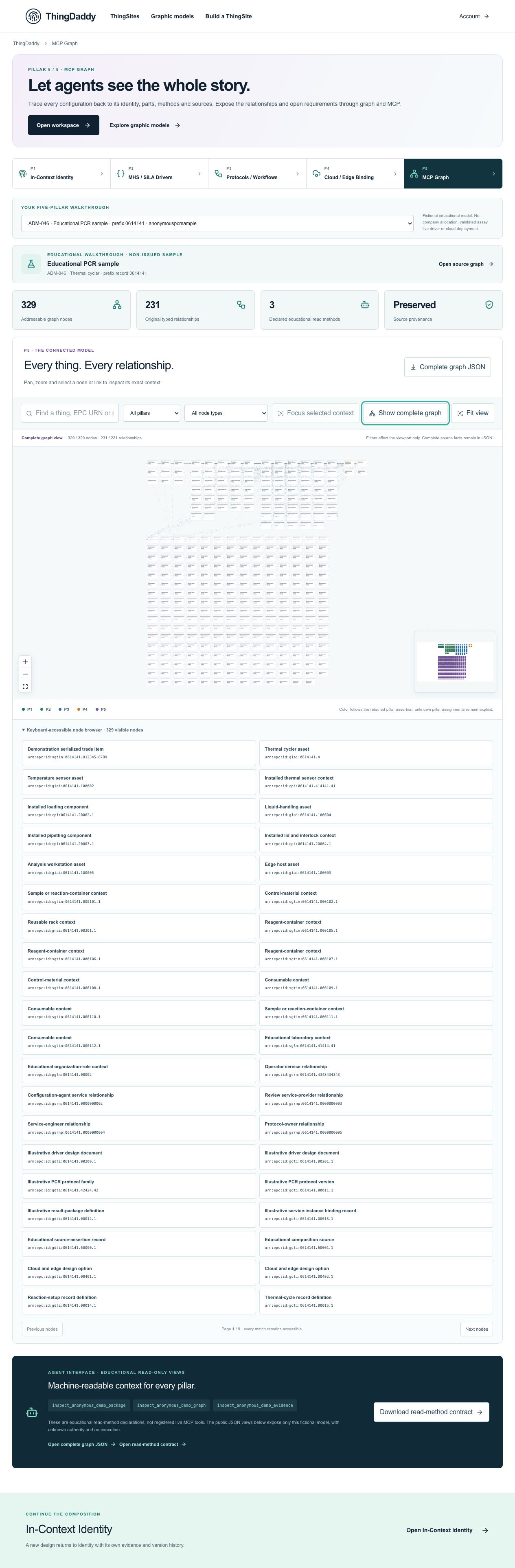
Earlier anonymous demonstration capture · Earlier local anonymous educational preview; not current physical execution or hosted acceptance · not evidence that this exercise has been performed. Open the image for full resolution.
Screenshot provenance
SHA-256 367c2d22d84008baee5ff650312e733537d89cbfa782caec98c4df0b4fe837e1Captured 2026-10-13T05:33:31.399Z. Source-package pin: 2f78a982141bda51ba64ea8ccb3a07f527eec3f77cf89baaa1f05c102197f6fd. Original screenshot bytes preserved.
Step by step
01 Start from the complete model
Screen or control: Show complete graph · Fit view
Why: A stable baseline makes subset behavior measurable.
How: Open P5 and restore the complete graph before filtering.
What you should see: The view reports 329/329 nodes and 231/231 relationships.
Verify: Record both node and relationship counts; do not use the minimap’s tiny squares as a different source count.
02 Filter one pillar and type
Screen or control: Graph pillar · Graph node type
Why: A filter should declare what it excludes.
How: Select P3 as Graph pillar. Then choose a visible step-definition-document type. Read Explicit visual subset and the count denominators.
What you should see: Only matching nodes and edges between visible endpoints are drawn; original source facts remain available.
Verify: Do not describe the visible relationship count as the full protocol relationship total. Restore the complete graph before the next test.
03 Search an exact address and test an empty result
Screen or control: Search graph nodes
Why: Search is navigation, not identity assignment or approximate substitution.
How: Search urn:epc:id:giai:0614141.4, then search no-such-context-123456. Read the resulting subset or no-match state.
What you should see: The exact search retains matches by record/address context; the unknown text yields no nodes rather than selecting a similar label.
Verify: Clear the search or use Restore the complete graph. Exact selection for identity-sensitive work should use the validated context link, not substring matching alone.
04 Compare focused view and full export
Screen or control: Exact asset graph link · Complete graph JSON
Why: The export must preserve nodes excluded from the viewport.
How: Open the exact asset graph link to focus its direct context. Download Complete graph JSON and inspect P5.nodes/P5.edges in the wrapper.
What you should see: The focused view has a smaller visible subset; the file still contains 329 nodes and 231 original directed edges.
Verify: Record visible and complete counts separately. The raw graph API uses top-level nodes/edges, unlike the UI export wrapper’s P5 object.
05 Verify every node remains reachable
Screen or control: Keyboard-accessible node browser · Next nodes
Why: Accessibility must not silently truncate the source model.
How: Restore the complete graph and open the accessible node browser. Use Next nodes through the nine pages; inspect a record near the end.
What you should see: Every visible source node remains listed across 40-per-page groups, with the final page containing the remainder.
Verify: Confirm Page 9/9 and that a listed exact node opens its inspector. Paging changes UI only, not JSON or original data.
What is happening under the surface
Search, pillar, type and focused direct-neighbor context are viewport projections only.
The displayed numerator is visible records; the denominator is the complete 329-node/231-edge source.
The keyboard-accessible node browser pages 40 visible matches per page. Complete graph JSON exports the original full graph, even while a visual subset is active.
Common mistakes
- Substring search is not proof of identity equivalence.
- A visible numerator must not replace a complete denominator.
- The source JSON shape differs between package, raw graph view and UI download wrapper; identify the container before counting.
The records an agent needs
Viewport-prefixed names are presentation filter state, not extra fields written into the source package. Focus includes the selected node, its direct neighbors and original edges between visible endpoints, not every two-hop record. Complete exports are independent of that projection.
Exact retained identities
urn:epc:id:giai:0614141.4Anonymous package occurrence pointers
#/P5/nodes#/P5/edges#/P5/nodes/1Fields or record paths to inspect
viewport.queryviewport.kindviewport.pillarviewport.focusedIdnodesedgesabPointers locate records; hashes pin bytes; lesson numbers locate teaching material. None substitutes for an applicable assigned GS1 identity.
Apply what you learned
Produce a filter/reset/export verification receipt.
Prepare these outputs
- Complete, P3/type-filter and focused view counts.
- An empty-result test and successful reset.
- A complete graph export showing 329 nodes/231 edges and the accessible browser’s final page.
Review your work against these checks
- All exclusions are labeled visual subsets.
- Full source and directed edges survive every view operation.
- No unknown search result is replaced with a guessed node.
Check your reasoning
You download Complete graph JSON while a focused subset is displayed. What should the file contain?
This answer stays in page memory, is cleared when you leave, and is not sent or recorded as certification, validation or authority.Source and current boundaries
Screen basis: the anonymous public educational fixture at /api/demo/pillars, namespace 0614141. No private company record is read by this course.
Pinned assessed package SHA-256: b06ee255d0943a048511092595db4b98281b9b761d1910d19e6c3dba82591d94. Its complete graph contains 329 nodes and 231 directed relationships; original excluded assertions remain separately retained provenance. Lesson locators are educational numbers, not issued GS1 keys.
Scope: fictional authored records, non-issued identity proposals, unknown authority, no physical command, assay validation, cloud deployment or execution authorization.
fictional authored, non-issued, read-only
b06ee255d0943a048511092595db4b98281b9b761d1910d19e6c3dba82591d94Open primary referenceReading, answering a question and opening a diagram do not issue identifiers, validate a scientific method, establish company authority, commission an environment or authorize physical action.