2020 · Graph and agent inspection
Read the agent contract without claiming an installed MCP tool
Compare the public package, graph and read-method contract while distinguishing fixture declarations from registered live MCP or authorized action tools.
Open a workspace beside this lesson. Protected links keep their existing access gates; no new permission is granted by this course.
Opening the fixed anonymous evidence graph…
Why this matters
Agent-first learning requires structured context and explicit interface maturity.
A method name in JSON is not evidence that a tool was registered, called or connected to an instrument.
Read the screen with the explanation
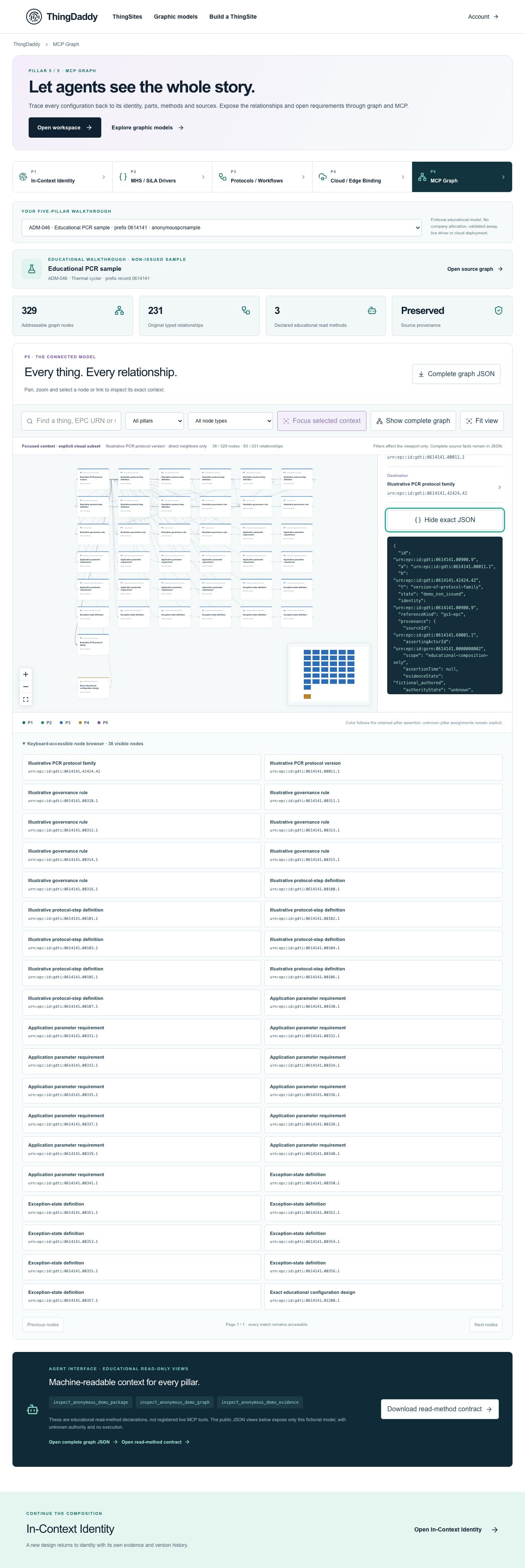
Earlier anonymous demonstration capture · Earlier local anonymous educational preview; not current physical execution or hosted acceptance · not evidence that this exercise has been performed. Open the image for full resolution.
Screenshot provenance
SHA-256 87e4c8980c6c1449400ead12f24d7a855baf6632ba2a95a6db88bb2abc995762Captured 2026-10-13T06:34:02.862Z. Source-package pin: 2f78a982141bda51ba64ea8ccb3a07f527eec3f77cf89baaa1f05c102197f6fd. Original screenshot bytes preserved.
Step by step
01 Read the declaration boundary
Screen or control: Agent interface · educational read-only views
Why: Tool maturity must be explicit before an agent relies on it.
How: Open P5 and read the educational agent-interface panel below the graph.
What you should see: The panel explicitly says these declarations are not registered live MCP tools.
Verify: Record the three method names as descriptions only; do not report three successful tool calls.
02 Inspect all three public views
Screen or control: Open complete graph JSON · Open read-method contract · Public package link
Why: Each representation has a defined scope and shape.
How: Open package, graph and mcp views in separate browser tabs. Compare schema, lane, status, nodes/edges container and boundaries.
What you should see: All views expose only the anonymous fixture; package has P1–P5, graph uses top-level nodes/edges, and mcp nests graph nodes/edges.
Verify: Confirm none of these links carries a tenant, private lane or company resource selector.
03 Verify registration and action boundaries
Screen or control: Open read-method contract · Download read-method contract
Why: The original machine-readable state must support the visible warning.
How: Read registrationState in the mcp view and inspect P5.mcpFixture in the package or downloaded contract. Check mutationTools and executionAuthorized.
What you should see: Registration is descriptions-only-not-registered, mutations are absent, and execution authority remains false.
Verify: Do not claim the public mcp projection has a mutationTools field if absent from that projection; its empty list is retained in the package contract.
04 Prepare a bounded agent inspection request
Screen or control: Exact step-participant graph link · Inspect exact JSON
Why: Useful agent work can remain read-only and identity-specific.
How: Open the exact cycler-from-step 6 context link. Write a proposed inspection request naming its exact node, source occurrence and relationship, plus the required return data.
What you should see: The graph exposes the original selected record and provenance without executing a command.
Verify: Your request must ask for evidence/unknowns only. It cannot grant physical/cloud action or assert that a declared method was installed or invoked.
What is happening under the surface
The fixture declares three educational read methods: inspect_anonymous_demo_package, inspect_anonymous_demo_graph and inspect_anonymous_demo_evidence.
registrationState is fixture-descriptions-only-not-registered. The public endpoint exposes bounded package, graph and mcp JSON views.
mutationTools is empty in P5.mcpFixture and executionAuthorized is false. The mcp projection is a read-method description, not the website’s separately registered and authorized private MCP implementation.
Common mistakes
- Do not call a JSON view an installed MCP server merely because view=mcp appears in its URL.
- A declared method count is not a successful invocation count.
- An exact identity or readable graph does not authorize mutation or execution.
The records an agent needs
The public JSON endpoint is a bounded educational data view. The fixture-method declaration and the site’s actual registered MCP tools have different contracts and authorization. This lesson proves readable source context, not live MCP registration, hardware control or model-weight training.
Exact retained identities
urn:epc:id:giai:0614141.4urn:epc:id:gdti:0614141.00105.1urn:epc:id:gdti:0614141.00900.190Anonymous package occurrence pointers
#/P5/mcpFixture#/P5/mcpFixture/tools#/P5/mcpFixture/registrationState#/P5/mcpFixture/mutationTools#/boundaries#/P5/edges/189Fields or record paths to inspect
schemaendpointviewstoolsregistrationStatemutationToolsexecutionAuthorizedboundariesPointers locate records; hashes pin bytes; lesson numbers locate teaching material. None substitutes for an applicable assigned GS1 identity.
Apply what you learned
Produce a read-only agent contract review and exact inspection request.
Prepare these outputs
- Three view URLs and their data-container differences.
- Registration/mutation/execution states with source pointers.
- A bounded request for the exact step-participant node and directed assertion, including explicit unknowns.
Review your work against these checks
- No private company lane is requested.
- Declarations are not mislabeled as installed or invoked tools.
- No hardware/cloud action or adaptive-learning outcome is claimed.
Check your reasoning
The mcp view lists three method names. What has been demonstrated?
This answer stays in page memory, is cleared when you leave, and is not sent or recorded as certification, validation or authority.Source and current boundaries
Screen basis: the anonymous public educational fixture at /api/demo/pillars, namespace 0614141. No private company record is read by this course.
Pinned assessed package SHA-256: b06ee255d0943a048511092595db4b98281b9b761d1910d19e6c3dba82591d94. Its complete graph contains 329 nodes and 231 directed relationships; original excluded assertions remain separately retained provenance. Lesson locators are educational numbers, not issued GS1 keys.
Scope: fictional authored records, non-issued identity proposals, unknown authority, no physical command, assay validation, cloud deployment or execution authorization.
fictional authored, non-issued, read-only
b06ee255d0943a048511092595db4b98281b9b761d1910d19e6c3dba82591d94Open primary referenceReading, answering a question and opening a diagram do not issue identifiers, validate a scientific method, establish company authority, commission an environment or authorize physical action.