2025 · Whole-site journey and practice
Edit a local workflow proposal and inspect the command
Create a reversible teaching change without overwriting the original procedure.
Open a workspace beside this lesson. Protected links keep their existing access gates; no new permission is granted by this course.
Why this matters
The workflow tool describes order and roles. Changes must be inspectable as proposals rather than silently becoming approved procedures.
A human canvas action and an agent command should use the same governed editing operation; a diagram alone is not an audit trail.
Read the screen with the explanation
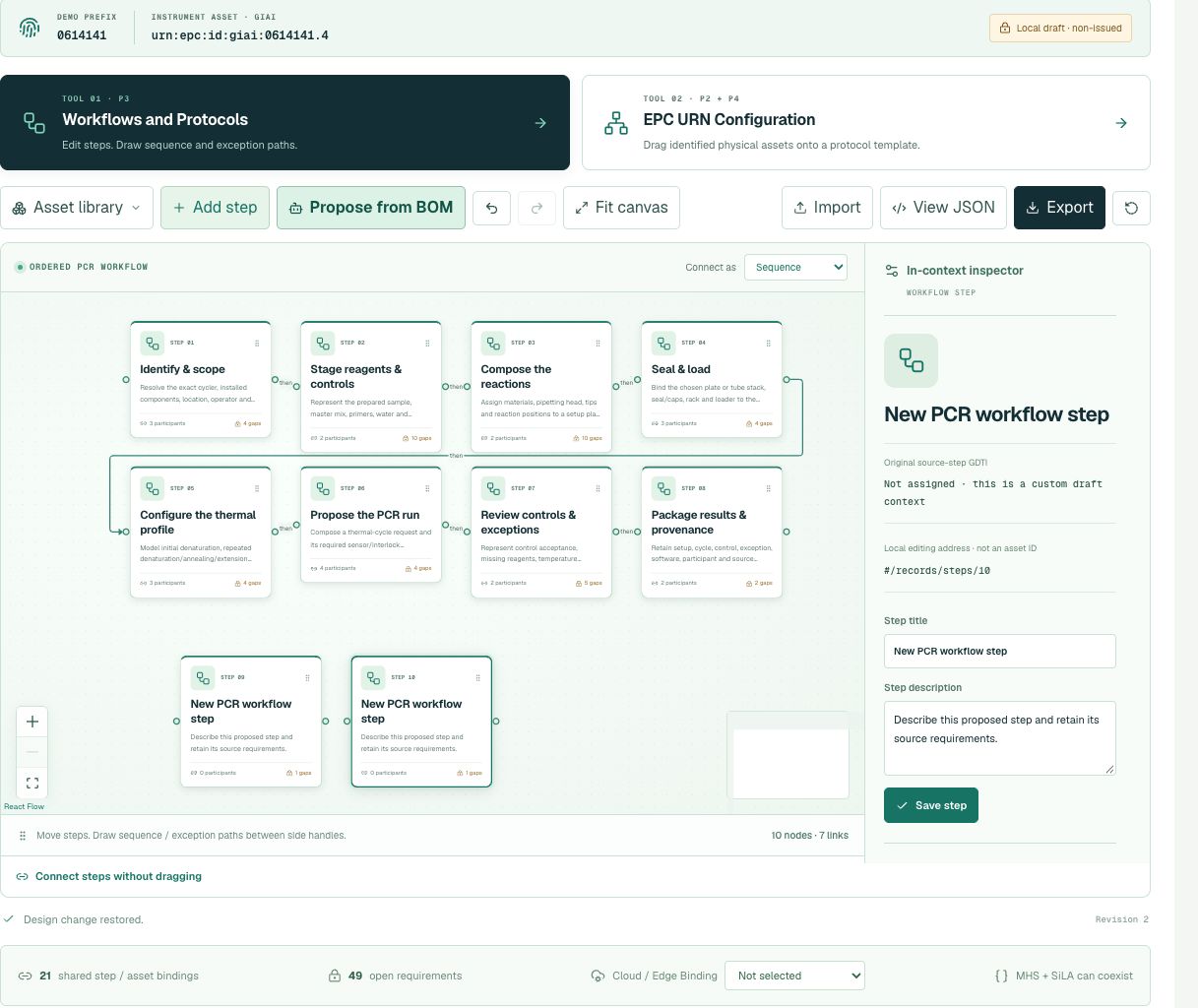
Earlier anonymous demonstration capture · Earlier local anonymous educational preview; not current physical execution or hosted acceptance · not evidence that this exercise has been performed. Open the image for full resolution.
Screenshot provenance
SHA-256 2bf27b2fd9e504f6e6230b7cc9b3043f6fd191d66b5b116ef30ae247393d4cd3Captured 2026-10-13T06:27:50.233Z. Source-package pin: 2f78a982141bda51ba64ea8ccb3a07f527eec3f77cf89baaa1f05c102197f6fd. Original screenshot bytes preserved.
Step by step
01 Inspect the starting draft
Screen or control: Workflows and Protocols in the graphical configuration tool
Why: Without a baseline you cannot tell which facts a proposed change altered.
How: Open the demo studio if your existing account permits it. Inspect its current local draft before editing; do not assume it is a blank or the same baseline as an earlier screenshot.
What you should see: A recorded starting step count and exact source references.
Verify: Separate source steps from any earlier local proposals.
02 Add one educational review checkpoint
Screen or control: Add step
Why: A review step illustrates composition while avoiding physical command dispatch.
How: Add a proposed review checkpoint in the workflow tool. Inspect the new step’s local address, position and unassigned document identity. The title is a human label, not an identifier.
What you should see: One additional proposed step in the local design.
Verify: Original source-step references are still present; no identity or approval was issued.
03 Compare graphical and structured operations
Screen or control: Structured command editor and Export
Why: The same design operation should have the same semantics for a human and an agent.
How: Inspect the command method and exported draft. Identify the proposed operation and its target without submitting any unrelated command or changing the source data.
What you should see: An inspectable proposal and command representation.
Verify: The export still states that no physical or cloud action was sent.
What is happening under the surface
The demo configuration studio is a protected browser-local teaching tool. Its local editing addresses are not issued GS1 identities.
The original source steps and identifiers survive beside new proposed steps. A local title can change without changing the original manufacturer/source procedure.
Common mistakes
- Calling a local edit a customer-approved protocol.
- Replacing the original procedure with the new title.
The records an agent needs
These are local proposal and command fields. Their presence is not proof of server persistence, scientific validation or assigned GS1 identity.
Exact retained identities
No assigned value is supplied for this exercise. Do not invent one.
Anonymous package occurrence pointers
#/P3/protocolTemplates/0/ordered_stepsFields or record paths to inspect
draft.steps[*].sourceIddraft.steps[*].iddraft.commandLog[*].commandPointers locate records; hashes pin bytes; lesson numbers locate teaching material. None substitutes for an applicable assigned GS1 identity.
Apply what you learned
Add one review checkpoint and document exactly what changed.
Prepare these outputs
- Before/after source and proposed step counts.
- The new local step address and its identity state.
- An exported draft or a read-only description if the account cannot enter the tool.
Review your work against these checks
- Only the intended proposal changed.
- The original procedure remains addressable.
- No execution or durable server-save claim is made.
Check your reasoning
What does adding a step in the local demo establish?
This answer stays in page memory, is cleared when you leave, and is not sent or recorded as certification, validation or authority.Source and current boundaries
The local studio and public read-only protocol are separate experiences. An edit in the studio does not mutate the anonymous pillar fixture.
Reading, answering a question and opening a diagram do not issue identifiers, validate a scientific method, establish company authority, commission an environment or authorize physical action.